Saturday, 19 November 2011

Create Printer Friendly Blog Pages with Simple CSS


eco printer friendly blog
Jay White of DumbLittleMan.com writes - "Have you found a good way to allow readers to print individual post content without all of the sidebars, ads and headings messing up the print format?"
Extra stuff like logos, forms, navigation links, advertising, blogrolls, flash widgets, etc may look good when your blog page is viewed inside the web browser but these elements are almost useless for people who want to print out web pages on paper.
How to Create Printer Friendly Web Pages with a Print Style Sheet
With little effort, you can turn your blog into a printer friendly and environment friendly website (since readers will consume less ink and paper when printing your articles).
Step 1: Create a new CSS File (print.css) and add the following lines:
body {font-family: arial,helvetica,sans; font-size: 13px; background:fff; color:000;}
// Black Text on White Background
a,a:visited,a:link {color:#000; text-decoration:none} 
// Do no underline links
.noprint {display:none} // This will do the magic
Step 2: Open the HTML source of your main blog template and enclose everything other than the content (like the sidebars, ad blocks, header logo, footers, etc) inside the following <span> tag
<span class="noprint"> ..... </span>
You are instructing the browser not to print anything that appears inside the above tag.
Step 3: Add the following line inside the <HEAD> tag of your blog template
<link rel="stylesheet" media="handheld,print" href="print.css" />
That's it. To see how this works, click here and go to File->Print Preview.
This technique is not just effective for printed version of your web pages but even for PDFs - if someone prints your blog as a PDF document, they'll see a clean version of the article without the extra bells-n-whistles. See - "Print to PDF Button for Blogs"

Promoting a Blog through Facebook Advertising and Google Adwords


advertisingI recently experimented with running a 7-day advertising campaign for this blog on Facebook as well as the Google network using Adwords.
This was my second attempt and the results are pretty encouraging.
I mainly targeted the 20-35 age group on Facebook who are based in India with some level of education and any marital status. In the case of Google Adwords, the ads were only shown to Internet users in India where were looking for technology related websites.
First, here are the individual performance reports for AdWords and Facebook advertising:
Google Adwords (Ads were shown on Google search and sites that use AdSense)
google-search
Facebook Advertising (with a daily advertising budget of $5)
facebook-advertising
If you compare these tables, Facebook can deliver tons of impressions for a small amount of money but the average cost of visitor acquisition (CPC) is higher for Facebook than Google Adwords.
Now Google Analytics tells me that a visitor from either of these advertising networks spent anywhere between 2-3 minutes on the page which is not bad at all.  The bounce rate for visitors from Google were nearly the same as the site average but in the case of Facebook, the bounce rate was 25% less than the site average.
google-analytics
This was just an experiment with a very low advertising budget but looking at the results, these advertising options are definitely worth exploring as they deliver if you can target the right crowd.
If you have never tried advertising with Facebook, it even allows you to target employees of a particular company or students of a particular college. For example, you may set your ad to appear only on the terminals of Google employees or students of IITs and IIMs.

Embed Chat in Your Blog: Interact with Site Visitors in Real Time


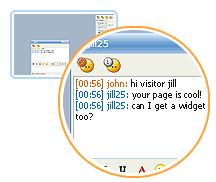
Blog Chat EmbeddedGabbly, Meebo Me and Stickam are three very popular IM services that let you embed live chat window plugins in your web pages or blog. So you can either chat with people while they are on your site or even the site visitors can chat among themselves.

Now since these blog chat addons are done in Macromedia Flash, visitors need not download or install anything in order to get started. As soon as they open your blog in any web browser, they are ready to converse with either you or other blog readers.

Why should I embed Live chat in my blog ?

Here are some reasons:

» It could be a great opportunity to get instant feedback about your blog from site visitors. A lot of your site fans may want to send you comments but they are sometimes too lazyto write you an email or even dropping a line in the comment section. But with these services, the visitor can start a conversation with you by simply typing in the text area - they can even choose to remain anonymous.

» A lot of service oriented and product websites have a "Talk to our representative" or "Live Support" button where visitors can speak with their support staff online without dialing any number or writing emails. If you also need to provide a similar customer support service on your blog or web page but don't have big budget, these IM services may be just right for you. Business online with zero setup cost.

» If you place Meebo Me in your site, it will show you the number of visitors who are currently visiting your site. The visitors will automatically appear as guest inside the meebo chat window even when they don't plan to chat. No web analytics program like Statcounter or sitemeter would ever be able to tell you how many people were on your site at 11:32 am.

I thought they would slow down my web page ?

Though all the three services download a swf file on the client computer, the footprint is very small and the visitors may not even notice any change in the site loading time. However, if you are still not comfortable with integrating chat windows in your main web pages, you can place them in a pop-up window which will only open when the visitor clicks on the hyperlink.

Gabbly vs Meebome vs Stickam - Which is better ?

It really depends on what you want to do with the service like do want to have control over the size of the widget, want group discussion, video chatting or just text chatting. Here's a quick review of the three services:

Meebo Me has a very pleasing interface and comes in three standard sizes so you can either fit it easily in the blog sidebar, main post or even in a popup. You will have to login into your meebo account so when someone visits your site, they will be able to instantly communicate with you through the meebome widget. [Thanks, Shahrzaad Parekh]

Stickam lets you do a live video chat with site visitors. The service is miles ahead of competition in terms of features and customization options. You can add your own skins, profile picture or even change the background color. Other than text chat, Stickam lets you share videos, photos, music within the player. Robin Good has a more detailedreview of Stickam when it was in the beta phase.

Gabbly lets you choose any custom height and width of the chat window so you can customize it as per your blog layout. Gabbly is for group chat so everyone who visits your page will then be able to chat with one another. The conversation can be subscribed to via rss feeds [gabbly chat for this blog]

Distribute Your Blog Through Nokia’s Ovi Store


mobile os marketshare
While Nokia gets little love from tech pundits in the west, Symbian powered mobile phones still command the highest market share worldwide and this number is significantly higher in Asia, South America and African countries.
Nokia’s Ovi Store has around 140 million users worldwide and thus, if you are content creator, the store presents an excellent opportunity for you to showcase your stuff to such a large audience in the form of an app.
Build an app in 60 seconds
If you have ever tried building an app for your blog for distribution through Apple’s App store, you know the drill. First, it requires you to have the technical know-how, you need an Apple developer account and, if you are writing the app on your own, you also need to have a Mac.
With Nokia’s Ovi Store, a person with no programming skills can build an app in minutes through an online wizard – all they need is a blog with an RSS feed. There’s no fees involved and your Ovi App created through the wizard can be downloaded on almost all Nokia devices except for some of the recent ones.
Nokia Ovi App Wizard
The wizard offers limited customization options -  you may change the background and text colors but nothing beyond that. If you have more than one feed, you may publish them all in a single app without having to merge them separately.
To give you an example, I created this mobile app for Digital Inspiration using the wizard, it got approved by the Ovi QA team in about a day (they need to confirm that you own the content) and now anyone, anywhere may download the app on their mobile through the Ovi Store.
How is the app any different from directly reading an RSS feed on the phone? Well, the biggest advantage is that the Ovi app optimizes your blog images for the mobile screen and thus the entries should load a lot quicker.
Also, when people have your blog installed as an app on the home screen of their mobiles, they’re probably going to check it more frequently.

Monitor your Blog Performance on the Social Web


Want to know how your blog is doing on social sites like Twitter and Facebook?
Simply go to twitter.labnol.org/analytics, type the feed address of your blog (or any other web site that offers an RSS feed), and hit the 'go' button.
The tool will tell you exactly how many times your most recent stories have been shared on Twitter and Facebook.
social media analytics

Add Language Translation Flags To Your Blog in One Easy Step; Reach Non-English Speaking Readers


What's you first reaction when you land on a website that's written in Russian, Chinese or Japanese ? Most of us would hunt for that English language translation flag and if that's missing, we will copy-paste the site address in Google Translate website or Yahoo Babelfish to convert the site content to English.

Way too much effort. Now let's reverse the roles and say somebody from China or Japan visits your blog (written in English). The foreign visitor will have exactly the same problems that you faced when you were visiting that non-English website above.

Since more than 65% of web users speak a language other than English, it is essential that you provide language translation features in your blog so that you don't miss the non-English speaking traffic. 

So when an Arabic visitor passes your English blog, he or she can just click the Arab flag to translate the website into his native language - That way you don't loose a visitor plus he could even subscribe if the content is good even if written in another language.

Here's a quick tutorial to add language translation to your blog. You can be any blogging platform including Blogger, Typepad, Wordpress that provides access to templates. The visitor will see nine country flags corresponding to German, Chinese, Japanese, Korean, Arabic, French, Portuguese, Spanish and Italian languages.

        
All you have to do is copy-paste the following lines of Javascript code anywhere in your blog template.

<form action="http://www.google.com/translate" >

<script language="JavaScript">
<!--
document.write ("<input name=u value="+location.href+" type=hidden>")
// -->
</script>

<input name="hl" value="en" type="hidden">

<input name="ie" value="UTF8" type="hidden">

<input name="langpair" value="" type="hidden">

<input name="langpair" value="en|fr" title="French" src= "http://photos1.blogger.com/img/43/1633/320/13539949_e76af75976.jpg" onclick="this.form.langpair.value=this.value" height="20" type="image" width="30">

<input name="langpair" value="en|de" title="German" src= "http://photos1.blogger.com/img/43/1633/320/13539933_041ca1eda2.jpg" onclick="this.form.langpair.value=this.value" height="20" type="image" width="30">

<input name="langpair" value="en|it" title="Italian" src= "http://photos1.blogger.com/img/43/1633/320/13539953_0384ccecf9.jpg" onclick="this.form.langpair.value=this.value" height="20" type="image" width="30">

<input name="langpair" value="en|pt" title="Portuguese" src= "http://photos1.blogger.com/img/43/1633/320/13539966_0d09b410b5.jpg" onclick="this.form.langpair.value=this.value" height="20" type="image" width="30">

<input name="langpair" value="en|es" title="Spanish" src= "http://photos1.blogger.com/img/43/1633/320/13539946_2fabed0dbf.jpg" onclick="this.form.langpair.value=this.value" height="20" type="image" width="30">

<input name="langpair" value="en|ja" title="Japanese" src= "http://photos1.blogger.com/img/43/1633/320/13539955_925e6683c8.jpg" onclick="this.form.langpair.value=this.value" height="20" type="image" width="30">

<input name="langpair" value="en|ko" title="Korean" src= "http://photos1.blogger.com/img/43/1633/320/13539958_3c3b482c95.jpg" onclick="this.form.langpair.value=this.value" height="20" type="image" width="30">

<input name="langpair" value="en|zh-CN" title="Chinese Simplified" src= "http://photos1.blogger.com/img/43/1633/320/14324441_5ca5ce3423.jpg" onclick="this.form.langpair.value=this.value" height="20" type="image" width="30">

<input name="langpair2" value="en|ar" title="Arabic" src= "http://photos1.blogger.com/blogger/3709/485/1600/arabic-flag.gif" onclick="this.form.langpair.value=this.value" height="20" type="image" width="30" />
</form>


Actually the above tutorial is an enhanced version of our previous Language Translation Tutorial which was a bit out of date since Yahoo acquired Babelfish and WorldLingo changed their translation URLs. 

Though the machine translation powered by Systran is generally not as correct as the service offered by professional translators, not all of us can afford an human powered translation. Plus the non-English visitor can alway connect the dots and make some meaningful sense of your content.

There's no translation support for Urdu, Russian, Hindi, Telugu or other Indian languages.

How To Make A Blog In Blogger.com Using Your Gmail Google Account


  • AT FIST YOU WANT GMAIL ACCOUNT